K8S Series Part 09 - Backups & Disaster Recovery: Three Layers, Three Failure Modes
Here's the uncomfortable truth about backups: a single backup strategy can't cover every disaster. "I deleted a row an hour ago" and "the house burned down" need completely different recovery mechanisms. Trying to serve both with one tool gets you something that's slow for the common case and useless for the rare one.
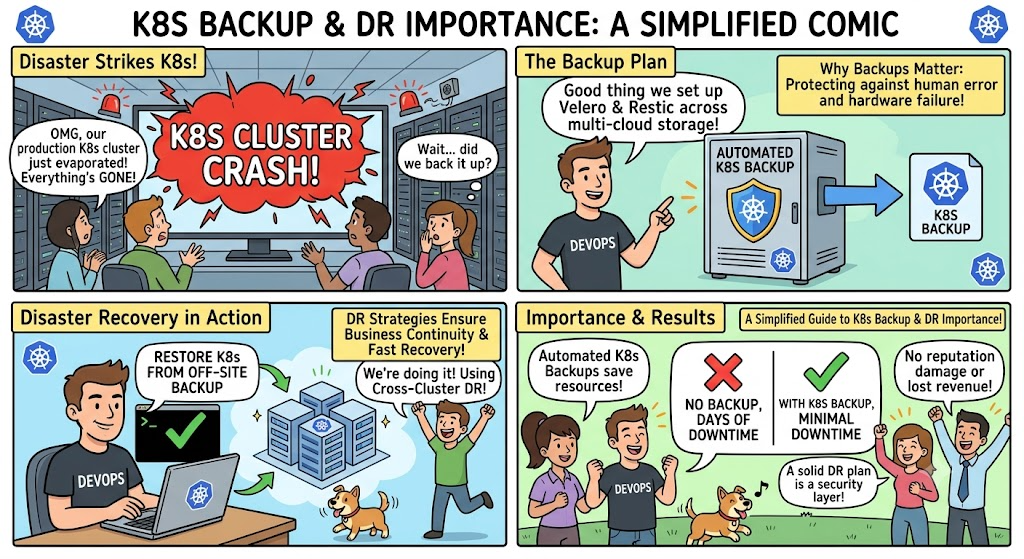
So I run three layers, each matched to a different failure mode. This article explains what each layer is for, and then walks through the thing they all exist to enable: rebuilding the whole cluster from nothing. This is by no means the best or ideal ways of proper DR and Recovery strategy but it is merely what I am using with the resource constrains I have.
The model: match the layer to the disaster
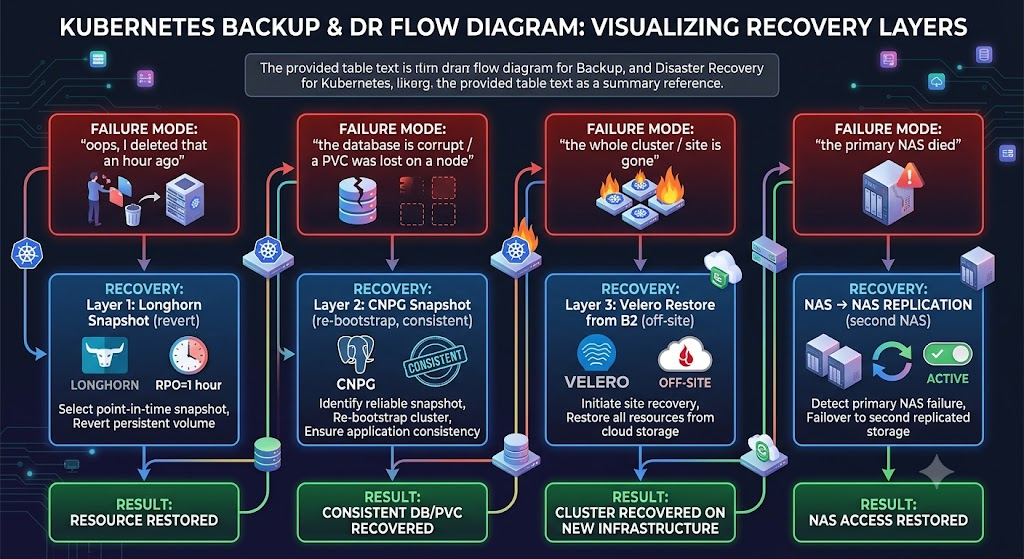
| Layer | Tool | Covers | Lives | Cadence |
|---|---|---|---|---|
| 1 | Longhorn snapshots | Recent in-cluster mistakes | On the volume (in-cluster) | On trigger |
| 2 | CNPG VolumeSnapshot | DB corruption / lost PVC | Longhorn (in-cluster) | Daily / weekly |
| 3 | Velero → Backblaze B2 | Cluster / site loss | Off-site object storage | Per-workload, staggered |
| + | TrueNAS replication | Primary NAS loss | Second NAS (LAN) | Every 30 min |
The layers also form a natural escalation: fast and local at the top, slow and durable at the bottom. You reach for the cheapest layer that covers the disaster in front of you.
Layer 1 - Longhorn snapshots
The fastest, most local recovery. Longhorn can take a point-in-time snapshot of a volume on the volume itself and revert to it in seconds. These are triggered (by a CNPG backup, a Velero backup, or manually) rather than scheduled directly, and retention is bounded by Longhorn's per-volume snapshot cap.
What it's good for: "I changed a setting / ran a bad command and want to undo it." What it's not good for: anything that takes out the node or the cluster - the snapshot lives on the same storage as the data.
Layer 2 - CNPG snapshots (application-consistent)
Covered in depth in article 06, but in the backup context the key property is consistency. A CNPG ScheduledBackup issues a CHECKPOINTto flush Postgres's dirty pages before triggering the Longhorn snapshot:
CHECKPOINT (flush) ──► VolumeSnapshot = guaranteed-clean DB recovery point
So when a database is corrupted, or a PVC is lost when a node dies, CNPG can re-bootstrap from a snapshot that's known-good. A daily retention CronJob prunes old snapshots across all four CNPG clusters.
This is the layer I'd actually use for the most likely data disaster: something went
wrong inside a database.
Layer 3 - Velero to Backblaze B2 (off-site)
This is the layer that survives losing the whole cluster, or the whole site.
Velero backs up two things together: the Kubernetes resource state (the objects - though in a GitOps cluster those are also in Git) and the persistent volume data. It ships both off-site to a Backblaze B2 bucket.
   Velero Schedule fires
     │
     ├─► CSI snapshot of the PVC via Longhorn
     │
     ├─► snapshotMoveData: true  ──► upload volume data to B2
     │
     └─► once upload succeeds, release the local Longhorn snapshot
The snapshotMoveData: true part is what makes it genuinely off-site: the data is moved into object storage, not just snapshotted locally. A local snapshot doesn't help if the local cluster is gone.
apiVersion: velero.io/v1
kind: Schedule
metadata:
  name: authentik-bimonthly
  namespace: velero
spec:
  schedule: "0 3 5,20 * *"          # 5th & 20th, staggered (see below)
  template:
    includedNamespaces: [authentik]
    snapshotMoveData: true
    storageLocation: default        # ──► the B2 bucket
    ttl: 720h
It is worth noting that at the time of writing this article, I am actively researching other S3 offerings, It seems that Cloudflare's free tier pricing is looking more attractive than B2.
Staggering, so I don't get rate-limited
I have a Velero Schedule per workload, deliberately staggered across days so that only one workload uploads to B2 on any given day:
   Day  5  → authentik      Day 11 → passzilla
   Day  7  → vaultwarden    Day 13 → photoprism
   Day  9  → monitoring     Day 20 → authentik (again)
   …weekly ones (affine, netbox) on fixed weekdays…
This avoids hammering B2's transaction limits, a cost and reliability win. The full schedule table lives in the repo's backup workbook.
The B2 credentials are stored as a SealedSecret (article 04) - even the off-site backup config is committed safely.
What's deliberately not backed up
Worth stating, because "back up everything" is a trap that wastes storage and money:
- Caches (Redis instances used purely as caches) - losing them costs a rebuild, not data. No backup.
- Bulk media on NFS - protected by TrueNAS's own snapshots + 30-minute replication to the second NAS, not by Velero. Pushing terabytes of photos to B2 on a schedule would be slow and expensive, and the NAS-to-NAS copy already covers a NAS failure.
- Derived/regenerable state - anything the app rebuilds on its own.
Backups are a cost/benefit decision per workload at the end of the day, especially for us homelabbers.
Disaster recovery: rebuilding from nothing
This is the test that proves the whole design. If all three machines were wiped, recovery is a short, ordered list - because of GitOps (article 02) and the layered backups:
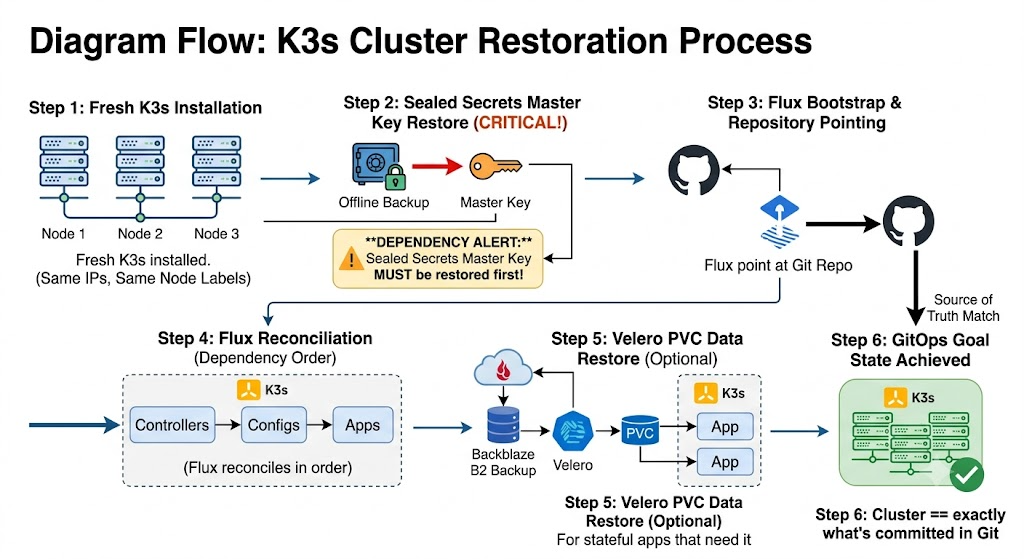
Step 2 is the one people miss and it's the most important: the master key must be restored before Flux runs. Every secret in the repo is sealed against that key; without it, the sealed-secrets controller can't decrypt anything, and apps that need credentials never come up. It's the single piece of state that can't live in Git, so it's the single thing your offline backup absolutely must contain.
What lives outside Git (the irreducible state)
GitOps means almost everything is reproducible from the repo. The exceptions - the only things a rebuild actually depends on externally - are:
- The sealed-secrets master key → offline, in an encrypted password manager.
- Longhorn volume data → backed up to B2 via Velero (layer 3).
- TrueNAS NFS data → replicated to the second NAS.
Three inputs: a fresh K3s install, this Git repo, and one key. Everything else is a
consequence.
Test your restores
A backup you've never restored is a hypothesis, not a backup. The failure modes hide in the restore path - a missing key, a snapshot that needed crash recovery, a cron that never actually fired. The layered model only earns trust once you've watched a restore come back clean. CNPG's consistent snapshots exist precisely because an early Velero-only, DB-unaware setup gave me backups I wasn't sure I could trust.
Takeaways
- One strategy can't cover every disaster. Match the layer to the failure mode.
- Layer 1 (Longhorn) = fast local undo; Layer 2 (CNPG) = consistent DB recovery; Layer 3 (Velero/B2) = off-site survival; NAS replication = file-storage survival.
snapshotMoveData: trueis what makes Velero genuinely off-site; stagger schedules to respect B2 limits.- DR order matters: master key first, then Flux, then volume restores.
- Test restores - an untested backup is just a guess.
Resources
This cluster
- k3s-safeqbit-local-hq repo - Velero
Schedules and the retention CronJob ininfrastructure/.../configs/; the DR procedure is documented in the repo's backup workbook
Documentation
- Velero documentation - backup, restore, schedules
- Velero: CSI snapshot data movement - what
snapshotMoveData: truedoes - Backblaze B2 Cloud Storage docs - the off-site target
- Longhorn: Snapshots and Backups
- CNPG: Backup and Recovery - the application-consistent layer
- Flux: bootstrap (GitHub) - step 3 of the rebuild
Final lesson → In Observability & external access, we wire up the cluster's senses, so I hear about a problem before anyone tells me, and open a door to the outside world without opening a single inbound port.