K8S Series Part 07 - Deploying an App the GitOps Way
The previous articles built the platform. Now the payoff: actually running an app. Every app I deploy follows the same skeleton, which makes the cluster predictable, once you've read one app folder, you can read them all.
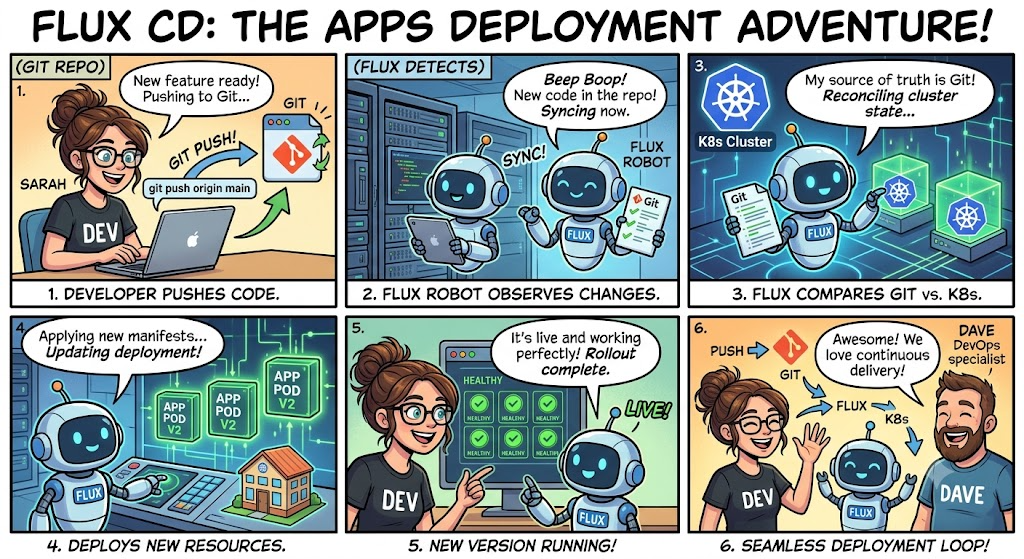
This article dissects that skeleton file by file, then shows how Flux turns a git pushinto a running service.
The shape of an app directory
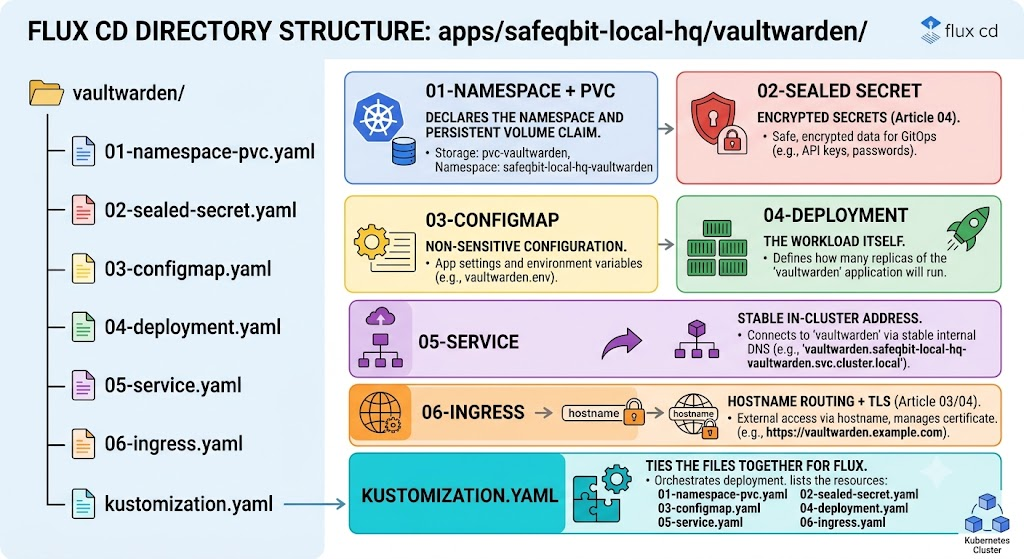
Every app gets a folder under apps/safeqbit-local-hq/<app>/, with numbered files so the ordering is obvious at a glance:
apps/safeqbit-local-hq/vaultwarden/
├── 01-namespace-pvc.yaml     # the namespace + its persistent storage
├── 02-sealed-secret.yaml     # encrypted secrets (article 04)
├── 03-configmap.yaml         # non-sensitive configuration
├── 04-deployment.yaml        # the workload itself
├── 05-service.yaml           # stable in-cluster address
├── 06-ingress.yaml           # hostname routing + TLS (article 03/04)
└── kustomization.yaml        # ties the files together for Flux
The numbers are for housekeeping and ease of reading, Kubernetes resolves dependencies itself and Flux applies the whole set together. But reading 01 → 06 top to bottom tells the story: here's the boundary, here are its secrets, its config, the thing that runs, how it's reached internally, how it's reached externally.
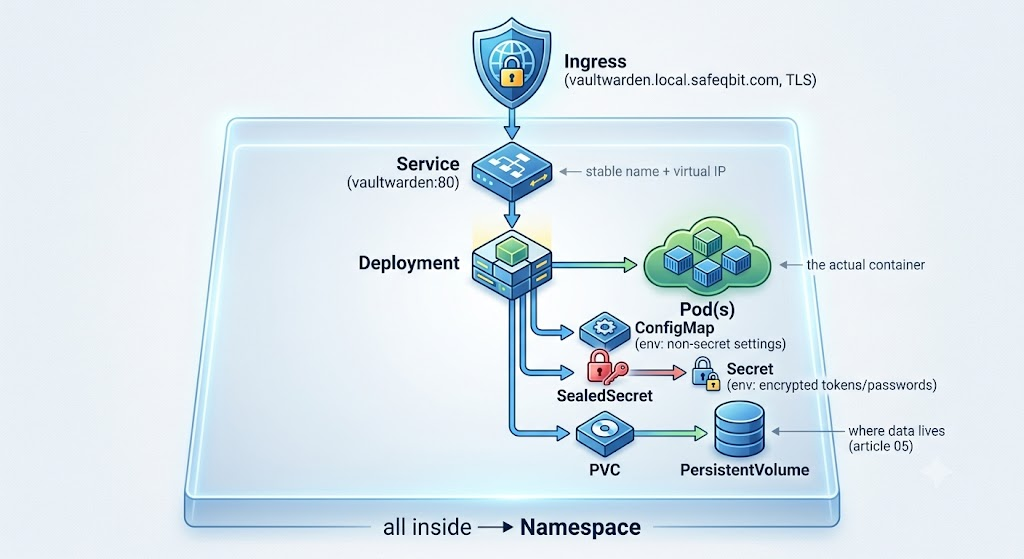
App Directory Structure
01 - Namespace (and PVC)
A namespace is the app's own walled garden - its objects, its name scope, a unit I can back up and reason about. I also put the app's storage claim here.
apiVersion: v1
kind: Namespace
metadata:
  name: vaultwarden
---
apiVersion: v1
kind: PersistentVolumeClaim
metadata:
  name: vaultwarden-data
  namespace: vaultwarden
spec:
  accessModes: [ReadWriteOnce]
  resources:
    requests:
      storage: 5Gi  # default StorageClass = Longhorn (replicated)
02 - Sealed Secret
The encrypted secrets, safe to commit (read more about it in article 04). Vaultwarden's admin token, SMTP password, etc.
apiVersion: bitnami.com/v1alpha1
kind: SealedSecret
metadata:
  name: vaultwarden-secret
  namespace: vaultwarden
spec:
  encryptedData:
    ADMIN_TOKEN: AgB...ciphertext...
03 - ConfigMap
Everything that is not secret and being explicit about that split matters. A ConfigMap is plain text in kubectl get, so nothing sensitive goes here.
apiVersion: v1
kind: ConfigMap
metadata:
  name: vaultwarden-config
  namespace: vaultwarden
data:
  DOMAIN: "https://vaultwarden.local.safeqbit.com"
  SIGNUPS_ALLOWED: "false"      # closed signups; flip briefly to add a user
  LOG_LEVEL: "warn"
  IP_HEADER: "X-Forwarded-For"  # trust ingress's forwarded client IP
04 - Deployment
The workload. A Deployment says "keep N copies of this container running and roll them out safely." Note how config and secrets are pulled in via envFrom, and the PVC is mounted:
apiVersion: apps/v1
kind: Deployment
metadata:
  name: vaultwarden
  namespace: vaultwarden
spec:
  replicas: 1
  strategy:
    type: Recreate               # ◄── RWO volume: avoid the RollingUpdate mount deadlock
  selector:
    matchLabels: { app: vaultwarden }
  template:
    metadata:
      labels: { app: vaultwarden }
    spec:
      containers:
        - name: vaultwarden
          image: vaultwarden/server:1.32.0   # pinned tag - reproducible
          envFrom:
            - configMapRef: { name: vaultwarden-config }
            - secretRef:    { name: vaultwarden-secret }
          ports:
            - containerPort: 80
          volumeMounts:
            - name: data
              mountPath: /data
          readinessProbe:
            httpGet: { path: /alive, port: 80 }
            initialDelaySeconds: 10
          livenessProbe:
            httpGet: { path: /alive, port: 80 }
            initialDelaySeconds: 30
      volumes:
        - name: data
          persistentVolumeClaim:
            claimName: vaultwarden-data
Two deliberate details:
strategy: Recreate- because the PVC is RWO (single-replica app on Longhorn), aRollingUpdatecan deadlock when the new pod and old pod land on different nodes (explained in article 05).Recreatestops the old
pod first, then starts the new, a blip of downtime, but no stuck rollout.- Probes -
readinessgates traffic (don't route until the app is actually up);livenessrestarts a hung container. Getting these right is the difference between "self-healing" and "silently broken."
05 - Service
A stable internal address in front of the pod(s). Pods come and go with changing IPs; the Service name (vaultwarden.vaultwarden.svc.cluster.local) never changes.
apiVersion: v1
kind: Service
metadata:
  name: vaultwarden
  namespace: vaultwarden
spec:
  selector: { app: vaultwarden }     # matches the Deployment's pod labels
  ports:
    - port: 80
      targetPort: 80
Theselectoris the contract: the Service routes to whatever pods carry matching labels. A typo here = a Service with zero endpoints = 503s from ingress. When an app returns 503,kubectl get endpointsis my first check.
06 - Ingress
Hostname routing + automatic TLS, exactly as in article 03:
apiVersion: networking.k8s.io/v1
kind: Ingress
metadata:
  name: vaultwarden
  namespace: vaultwarden
  annotations:
    cert-manager.io/cluster-issuer: letsencrypt-prod
spec:
  ingressClassName: nginx
  tls:
    - hosts: [vaultwarden.local.safeqbit.com]
      secretName: vaultwarden-tls
  rules:
    - host: vaultwarden.local.safeqbit.com
      http:
        paths:
          - { path: /, pathType: Prefix, backend: { service: { name: vaultwarden, port: { number: 80 } } } }
kustomization.yaml - the glue
This lists the files Flux should apply for this app:
apiVersion: kustomize.config.k8s.io/v1beta1
kind: Kustomization
resources:
  - 01-namespace-pvc.yaml
  - 02-sealed-secret.yaml
  - 03-configmap.yaml
  - 04-deployment.yaml
  - 05-service.yaml
  - 06-ingress.yaml
Wiring it into Flux
One more step: the app folder has to be registered so Flux knows about it. The top-level apps kustomization lists every active app:
# apps/safeqbit-local-hq/kustomization.yaml
apiVersion: kustomize.config.k8s.io/v1beta1
kind: Kustomization
resources:
  - vaultwarden
  - authentik
  - immich
  - netbox
  - affine
  - uptime-kuma
  - passzilla
  # - newapp        ◄── adding a line here is how a new app goes live
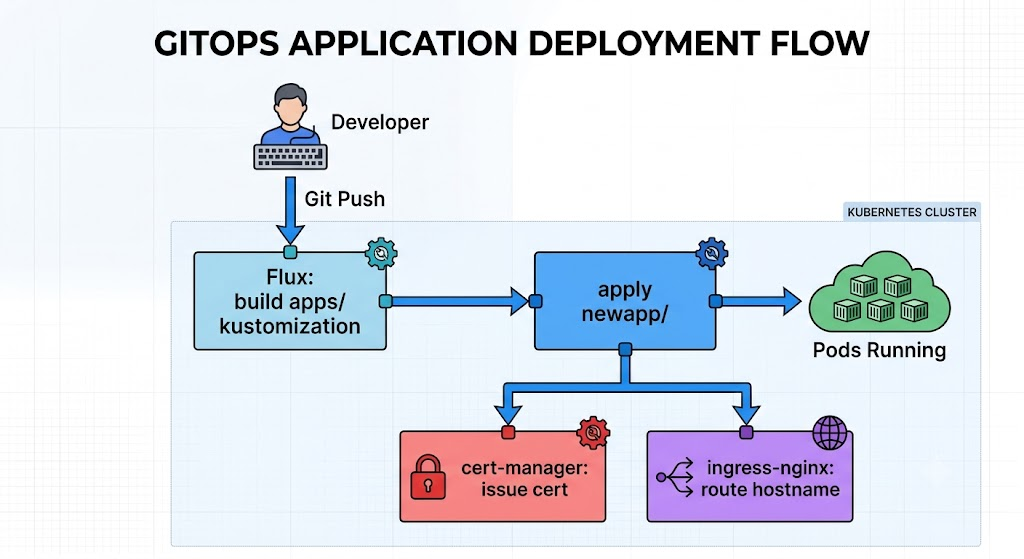
So the entire "deploy a new app" workflow is:
1. mkdir apps/safeqbit-local-hq/newapp/   and write the numbered files
2. seal any secrets with kubeseal           (article 04)
3. add "newapp" to apps/.../kustomization.yaml
4. git commit && git push
5. Flux reconciles → namespace, secret, config, workload, service, ingress appear
6. cert-manager issues the TLS cert; ingress starts routing the hostname
At this point we no longer need to run kubectl apply. No SSH. The commit is the deployment.
Variations on the skeleton
Not every app is this simple, but they're all the same idea with more pieces:
- App + database (Authentik, NetBox, AFFiNE): add a
03-cnpg-cluster.yamland a04-cnpg-scheduled-backup.yaml(article 06), and the app reads its DB password from
the CNPG-generated<name>-appsecret. - App + cache (Immich, NetBox, AFFiNE): a small Redis Deployment, sometimes with no
persistence (it's a cache - losing it is fine). - Helm-based app (Authentik): instead of a hand-written Deployment, a
HelmRelease(article 02) pins the chart and supplies values. Same folder pattern,
different workload file. - Bulk-storage app (Immich, PhotoPrism): PVCs point at NFS static PVs
(article 05) instead of Longhorn.
The skeleton scales: a trivial app is six files, a stateful app with HA Postgres and a
cache is a dozen, but the reading order and mental model never change.
Takeaways
- Every app is the same skeleton: namespace → secret → config → workload → service →ingress, glued by a kustomization and registered in the top-level apps list.
- Keep the secret/config split honest - ConfigMaps are world-readable inside the cluster.
- Mind the RWO +
Recreatedetail and get your probes right; that's what makes apps self-heal instead of silently break. - Deploying is a commit, full stop. The repo is the deployment mechanism and the documentation.
Most of my apps weren't created on the cluster, they were running on a Docker host first. Moving them over (and their databases) without losing data is its own discipline.
Resources
This cluster
- k3s-safeqbit-local-hq repo - every app folder under
apps/safeqbit-local-hq/follows the skeleton in this article; Vaultwarden's is the worked example
Documentation
- Kubernetes: Deployments - including update strategies (
RecreatevsRollingUpdate) - Kubernetes: Configure liveness/readiness/startup probes
- Kubernetes: Namespaces
- Kustomize and Flux Kustomization - how the folder is applied
- Vaultwarden wiki - the app used as the example here
Next lesson → In Migrating workloads and databases, we get our hands dirty: the repeatable playbook for moving a live app and its database off Docker and onto the cluster without losing a single row.