K8S Series Part 05 - Storage Options: Longhorn and NFS
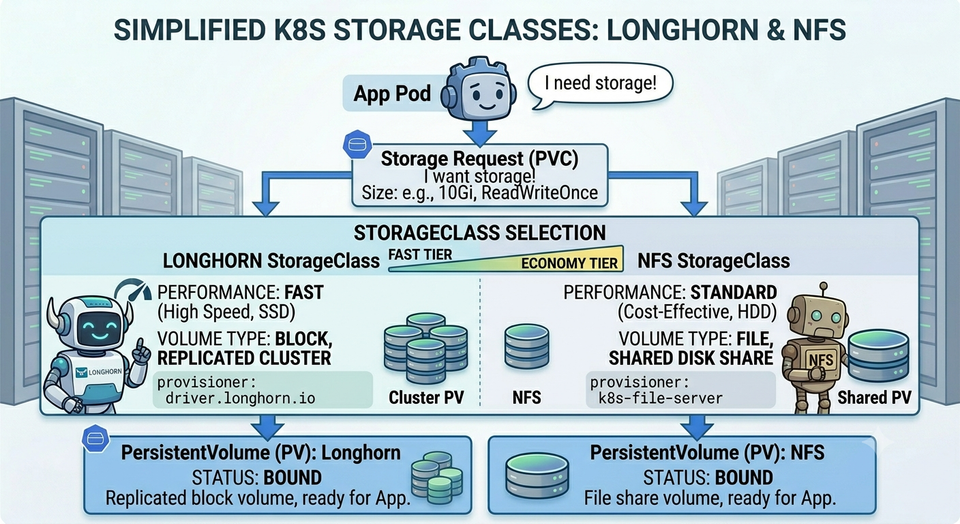
Pods are disposable. They get killed, rescheduled to other nodes or replaced on every update. So where does an app's data live so it survives all that? That's the job of persistent storage, and it's one of the trickier parts of running a cluster, because the data has to outlive the pod and ideally survive a node dying.
I run two storage systems side by side: Longhorn for replicated block storage, and an NFS shares on my TrueNAS for shared and bulk storage. This article explains the model, why two systems, and what I learned so far.
The vocabulary: PV, PVC, StorageClass
Kubernetes abstracts storage so apps don't care what's underneath:
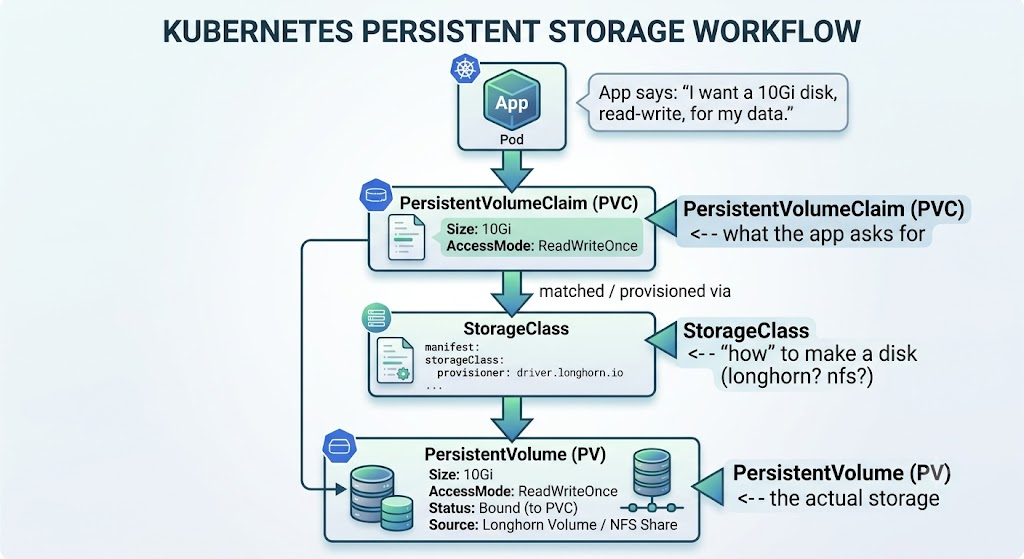
- A PVC is the app's request: size, access mode, and which StorageClass.
- A StorageClass is a recipe for dynamically provisioning storage on demand.
- A PV is the real volume that gets created and bound to the claim.
- The plumbing that talks to the storage backend is a CSI driver (Container Storage Interface) it is the standard Kubernetes driver uses to integrate any storage system.
Storage Access modes
| Mode | Short | Meaning |
|---|---|---|
| ReadWriteOnce | RWO | Mounted read-write by one node at a time |
| ReadWriteMany | RWX | Mounted read-write by many nodes at once |
| ReadOnlyMany | ROX | Read-only by many nodes |
Block storage (Longhorn) is almost always RWO so a block device can only safely be mounted by one node. NFS is naturally RWX which many pods on many nodes can share it. This single distinction drives most "which storage do I use?" decisions.
A gotcha worth internalising: an RWO volume + a Deployment usingRollingUpdatecan deadlock. During an update, the new pod tries to mount the volume before the old pod releases it but RWO only allows one node. If the two pods land on different nodes, the new one is stuckContainerCreatingforever. Fixes: useRecreateupdate strategy for RWO single-replica apps, or pin both to a node, or use RWX.
Longhorn: replicated block storage
Longhorn is a distributed block storage system that runs inside
the cluster. When an app asks for a volume, Longhorn carves it out of the nodes' local disks and crucially it keeps multiple replicas on different nodes.
   App PVC (10Gi, longhorn)
        │
        ▼
   ┌──────────────── Longhorn volume ──────────────────┐
   │   replica A          replica B          replica C │
   │   on Meatball        on Dumpling        on Omen   │
   └───────────────────────────────────────────────────┘
        every write is synchronously copied to all replicas
Why this matters: if Meatball dies, the data is still intact on Dumpling and Omen, and a pod rescheduled elsewhere reattaches to a healthy replica. Losing a node doesn't lose the data. This is the whole reason I don't just use one big disk on one machine.
Longhorn is my default StorageClass, so any PVC that doesn't specify otherwise lands here. It's where databases and any data I actually care about live. It also provides:
- Snapshots - point-in-time copies of a volume (the basis of backup layer 1; see
article 09). - A CSI snapshot interface, which is how Velero and CloudNativePG trigger
application-consistent backups. - A web UI for visualising volume health, replica placement, and rebuild progress.
# A typical app PVC - no StorageClass named, so it uses the default (longhorn)
apiVersion: v1
kind: PersistentVolumeClaim
metadata:
  name: uptime-kuma-data
  namespace: uptime-kuma
spec:
  accessModes: [ReadWriteOnce]
  resources:
    requests:
      storage: 2Gi
TrueNAS NFS: shared and bulk storage
Some workloads don't fit the replicated-block model:
- Shared access (RWX): several pods across nodes need the same files. NetBox's media and Authentik's templates/media are like this.
- Bulk capacity: my photo and video library is in terabytes. Replicating that three times across node-local NVMe would be absurd and expensive.
For these I mount NFS exports from my TrueNAS. Dynamic
provisioning is handled by nfs-subdir-external-provisioner: when a PVC asks for the NFS StorageClass, it just creates a new subdirectory on the NAS and points the PV at it.
   ┌─── cluster ──-─┐                 ┌──────── TrueNAS ─-───────┐
   │  pod ──┐       │   NFS (RWX)     │  /mnt/nvme2tb/k8s/       │
   │  pod ──┼──────►├────────────────►│    ├── pvc-abc/   (app1) │
   │  pod ──┘       │                 │    └── pvc-def/   (app2) │
   └────────────────┘                 └─────────────────────-────┘
I run two NFS tiers:
| StorageClass | Backing | For |
|---|---|---|
nfs-truenas |
TrueNAS NVMe pool (nvme2tb/k8s) |
General shared/RWX workload data |
nfs-bulk-media |
TrueNAS spinning-disk array | Large media libraries (RWX, Retain) |
For the photo apps (Immich, PhotoPrism), I use static PVs pointing directly at my existing media folders on the NAS. That meant migrating them onto the cluster required no data movement at all - the pods just mounted the directories that were already there.
# A static PV pointing at a pre-existing NFS path (no provisioner)
apiVersion: v1
kind: PersistentVolume
metadata:
  name: immich-media
spec:
  capacity: { storage: 50Ti }
  accessModes: [ReadWriteMany]
  nfs:
    server: 10.10.10.5
    path: /mnt/Media
  persistentVolumeReclaimPolicy: Retain    # NEVER auto-delete my photos
Note Retain: if the PVC is deleted, the PV (and the data) stays put. For irreplaceable data that's non-negotiable.
NFS redundancy
NFS share on a single server has the potential of becoming a single point of failure. I recommend running a second NAS share on secondary TrueNAS system that pulls a snapshot copies every 30 minutes over SSH, giving a continuously-updated second copy on the LAN.
Why two systems instead of one?
It comes down to matching the storage to the workload:
| Need | Use | Why |
|---|---|---|
| Database / app data I care about | Longhorn | Replicated across nodes; survives a node loss; snapshot-able |
| Shared files across many pods (RWX) | NFS | Block storage can't do RWX safely |
| Bulk media (TB-scale) | NFS bulk | Replicating TBs on local NVMe is wasteful; NAS is built for it |
| Existing data I don't want to migrate | Static NFS PV | Point at it in place, mount, done |
Longhorn gives resilience; NFS gives capacity and sharing. Using both lets each do what it's good at.
Troubleshooting storage
kubectl get pvc -A                       # Bound = good; Pending = not provisioned
kubectl get pv                            # the actual volumes + reclaim policy
kubectl describe pvc <name> -n <ns>       # Events: why it won't bind
kubectl get storageclass                  # which classes exist; which is default (marked)

# Pod stuck ContainerCreating? It's often a mount problem:
kubectl describe pod <name> -n <ns>       # Events: FailedMount / CSI errors
- PVC
Pending→ no provisioner for that StorageClass, or NFS server unreachable, or the cluster can't fit the request. - Pod stuck
ContainerCreating→ mount failure: check the node can reach the NFS server / the Longhorn replica is healthy. - RWO + RollingUpdate deadlock → see the gotcha above; switch to
Recreate.
Takeaways
- PVC = request, StorageClass = recipe, PV = the real disk; access mode (RWO vs RWX) is the decision that drives everything.
- Longhorn replicates block storage across nodes so a node loss isn't a data loss - my default for anything that matters.
- NFS handles shared (RWX) and bulk data; static PVs let you adopt existing data with zero migration.
- Storage problems often live below Kubernetes - be ready to look at the host.
Databases are the most demanding storage consumers, and "just putting Postgres on a PVC" isn't the cleanest, not to mention it carries risks of corrupting databases therefore in the next article is about doing databases properly with an operator.
Resources
This cluster
- k3s-safeqbit-local-hq repo - StorageClasses and NFS provisioners in
infrastructure/.../controllers/; static media PVs under the Immich/PhotoPrism app folders
Documentation
- Longhorn documentation - architecture, replicas, snapshots, backups
- Kubernetes: Persistent Volumes - PV, PVC, reclaim policies
- Kubernetes: Storage Classes and Access Modes
- Container Storage Interface (CSI) - the driver standard underneath
- nfs-subdir-external-provisioner - dynamic NFS provisioning
- TrueNAS documentation - the NAS serving the NFS tiers
- DM-Multipath (RHEL guide) - context for the
multipath.confblacklist fix
Next lesson → In Databases with CloudNativePG, we'll do databases properly: the operator that turns 25 lines of YAML into a self-healing, self-backing-up PostgreSQL cluster with failover in seconds.