K8S Series Part 04 - TLS and Secrets: cert-manager + Sealed Secrets
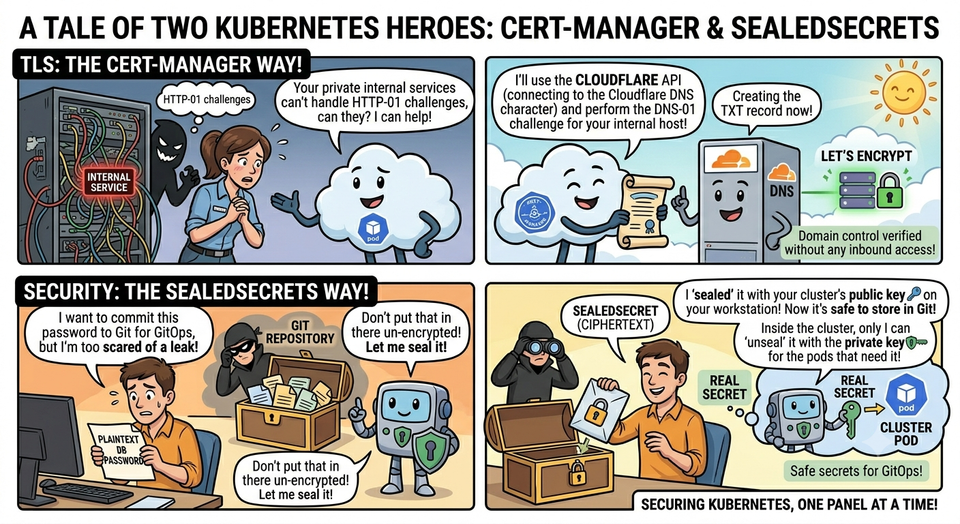
Two security problems sit right next to each other in a GitOps cluster:
- I want real HTTPS on every app - even ones that are only reachable on my LAN and never see the public internet.
- Everything is in Git, but apps need passwords and API tokens. You obviously can't commit those in plaintext.
cert-manager solves the first; Sealed Secrets solves the second. Both lean on public-key cryptography, and both are pure GitOps - no manual cert renewals, no out-of-band secret juggling.
Part 1 - cert-manager: HTTPS that renews itself
cert-manager is an operator that obtains and renews TLS certificates from an issuer (I use Let's Encrypt). You declare a Certificate (or annotate an Ingress), and it handles the rest: request, prove ownership, store the cert in a Secret, and auto-renew before expiry.
The internal-hostname problem, and DNS-01
Let's Encrypt has to verify you control a domain before issuing a cert. The common method, HTTP-01, works by serving a token at http://yourhost/.well-known/... - which requires Let's Encrypt to reach your host over the public internet. My services live on *.local.safeqbit.com and are not publicly reachable. HTTP-01 can't work.
The answer is DNS-01: instead of proving control via HTTP, you prove it by creating a specific TXT record in DNS. Since I run safeqbit.com's DNS on Cloudflare, cert-manager can create that record through the Cloudflare API - no inbound access required.
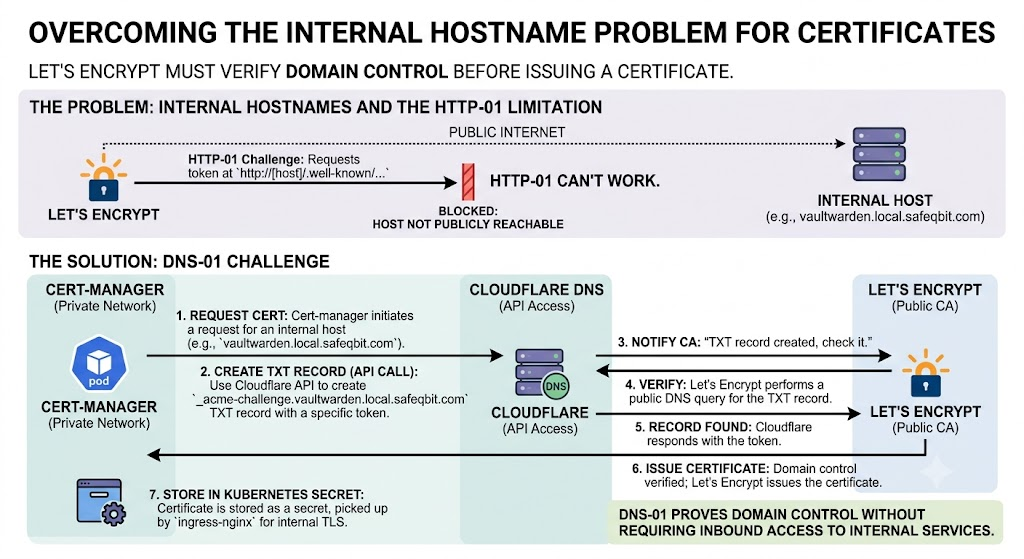
This is the elegant part: I get valid, publicly-trusted certificates for hostnames that aren't publicly reachable. No self-signed certs, no browser warnings, no clicking "proceed anyway" (which trains you into bad habits).
The pieces
The Cloudflare API token lives as a (sealed - see part 2) Secret, and an Issuer/ClusterIssuer references it. I keep two issuers:
# infrastructure/.../configs/cert-manager-issuers.yaml
apiVersion: cert-manager.io/v1
kind: ClusterIssuer
metadata:
  name: letsencrypt-prod
spec:
  acme:
    server: https://acme-v02.api.letsencrypt.org/directory
    email: <me>@example.com
    privateKeySecretRef:
      name: letsencrypt-prod-account-key
    solvers:
      - dns01:
          cloudflare:
            apiTokenSecretRef:
              name: cloudflare-api-token
              key: api-token
letsencrypt-staging- Let's Encrypt's staging endpoint. Untrusted certs, but very high rate limits. I test new setups here first.letsencrypt-prod- the real thing. Trusted certs, but strict rate limits (e.g. duplicate-cert caps per week). Burning through them by looping on a misconfiguration is a classic mistake hence staging first.
Then any Ingress gets a cert just by annotating it (from article 03):
metadata:
  annotations:
    cert-manager.io/cluster-issuer: letsencrypt-prod
spec:
  tls:
    - hosts: [vaultwarden.local.safeqbit.com]
      secretName: vaultwarden-tls     # cert-manager fills this Secret in
cert-manager sees the annotation, runs the DNS-01 dance, writes the cert intovaultwarden-tls, and renews it automatically ~30 days before expiry. I never think about it again.
Debugging a stuck certificate
kubectl get certificate -A       # READY=True is the goal
kubectl describe certificate vaultwarden-tls -n vaultwarden
kubectl get challenges -A        # DNS-01 challenge in progress?
kubectl describe order -A        # ACME order state + errors
kubectl logs -n cert-manager deploy/cert-manager
The usual culprits: a Cloudflare token without the right zone permissions, DNS not actually delegated to Cloudflare, or hitting prod rate limits (the error says so -
switch to staging while you sort it out).
Part 2 - Sealed Secrets: committing secrets safely
Now the harder philosophical problem. GitOps says everything lives in Git. But a
Kubernetes Secret is only base64-encoded, not encrypted - base64 is trivially
reversible. Committing one is the same as committing the password in plaintext. And once something is in Git history, it's there forever, even if you "delete" it later.
Sealed Secrets (by Bitnami) solves this with asymmetric encryption and a clean split of responsibilities:
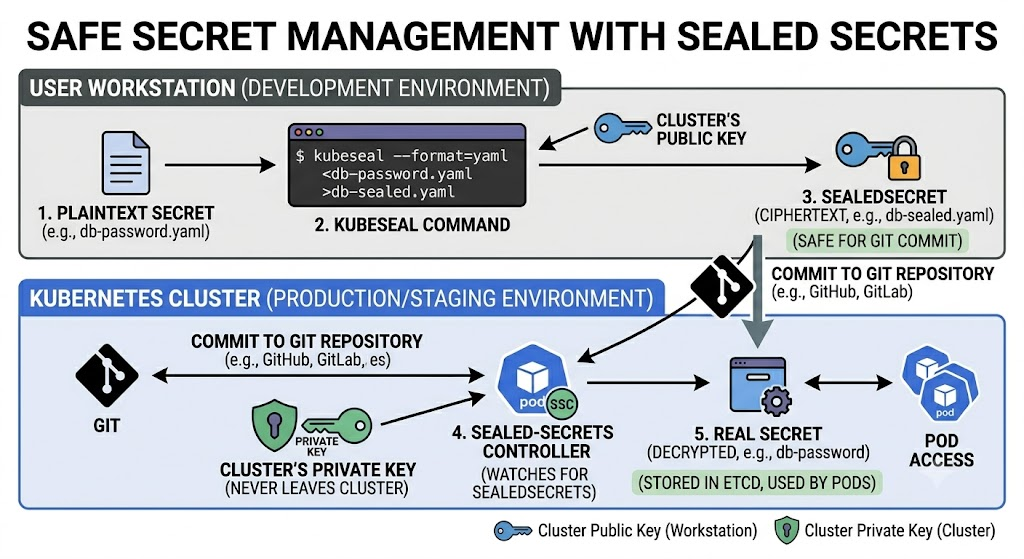
The key facts:
- Encryption uses a public key, so anyone can seal a secret, but
- decryption uses a private key that exists only inside the cluster (held by the controller in
kube-system). The ciphertext in Git is useless to anyone who isn't my cluster. - The committed object is a
SealedSecret; the controller turns it into a normalSecretat runtime. Pods consume the regular Secret and never know the difference.
Sealing a secret is very simple
# 1. Build a normal Secret locally, but DON'T apply it. Just render YAML.
kubectl create secret generic vaultwarden-secret \
  --namespace vaultwarden \
  --from-literal=ADMIN_TOKEN='super-secret-value' \
  --dry-run=client -o yaml \
| kubeseal \
    --controller-name sealed-secrets-controller \
    --controller-namespace kube-system \
    --format yaml \
> apps/safeqbit-local-hq/vaultwarden/02-sealed-secret.yaml

# 2. Commit the SealedSecret. The plaintext never touched the repo or the cluster.
git add apps/safeqbit-local-hq/vaultwarden/02-sealed-secret.yaml
What lands in Git looks like this - safe to make public:
apiVersion: bitnami.com/v1alpha1
kind: SealedSecret
metadata:
  name: vaultwarden-secret
  namespace: vaultwarden
spec:
  encryptedData:
    ADMIN_TOKEN: AgBy3i4OJSWK+PiTySYZZA9rO43cGDEq...   # opaque ciphertext
  template:
    metadata:
      name: vaultwarden-secret
      namespace: vaultwarden
    type: Opaque
Two road blockers I hit in practice with sealedsecrets
1. SealedSecrets are namespace and name-scoped. By default a secret sealed for namespace: foo cannot be decrypted in namespace: bar. This is a deliberate security property (it stops someone copying your sealed secret into a namespace they control and having the controller decrypt it for them). The practical consequence: when I renamed a namespace during a migration, a quick sed of the metadata field left the ciphertext still bound to the old namespace, and the controller silently refused to decrypt it. The fix is to re-seal, not text-edit.
2. The master key is the whole ballgame. The controller's private key can decrypt every secret you've ever sealed. So:
- I back it up offline, in an encrypted password manager never in the repo. Highly recommend you do the same.
- A cluster rebuild restores this key first (before Flux runs), otherwise every sealed secret fails to decrypt and nothing comes up. (we will dive more into this topic in DR in article 09.)
kubesealand the controller versions should match; after a controller upgrade, re-sealing may be needed.
How these two map to security standards
Neither choice is arbitrary, both line up with recognised guidance, which is part of why I made them:
- Encrypt secrets at rest + separate the key → CIS Kubernetes Benchmark §5.4 (Secrets Management) and NIST SP 800-57 (key management). The decryption key living offline, apart from the data it protects, is textbook root-of-trust handling.
- TLS everywhere, even internally → NIST SP 800-52 Rev. 2 and the OWASP Transport Layer Security guidance. Internal traffic is still interceptable; valid certs also stop users normalising "click through the warning."
Takeaways
- DNS-01 + Cloudflare gets you trusted certs for hostnames that never face the internet, the key trick for a LAN-only cluster.
- Always validate on the staging issuer before hitting prod's rate limits.
- A Kubernetes Secret is not encrypted; Sealed Secrets makes it safe to commit by encrypting with a public key only the cluster can reverse.
- Treat the sealing master key like the crown jewels: offline, backed up, restored first.
With ingress, TLS, and secrets covered, apps can be reached securely. But they also need somewhere to keep their data. Storage next.
Resources
This cluster
- k3s-safeqbit-local-hq repo - ClusterIssuers in
infrastructure/.../configs/cert-manager-issuers.yaml; everySealedSecretis committed alongside its app
Documentation
- cert-manager documentation
- cert-manager: DNS-01 with Cloudflare - the exact solver I use
- Let's Encrypt documentation and rate limits - test on staging first
- Sealed Secrets (Bitnami) -
kubeseal, scoping, key management - Kubernetes: Secrets - why base64 is not encryption
Standards referenced
- CIS Kubernetes Benchmark (§5.4 Secrets) · NIST SP 800-57 (key mgmt) · NIST SP 800-52r2 (TLS) · OWASP TLS Cheat Sheet · Twelve-Factor: Config
Next lesson → In Storage: Longhorn and NFS, we'll follow the data: where it actually lives, how it survives a node dying, and why I run two completely different storage systems side by side.