K8S Series Part 03 - Getting Traffic In: MetalLB + ingress-nginx
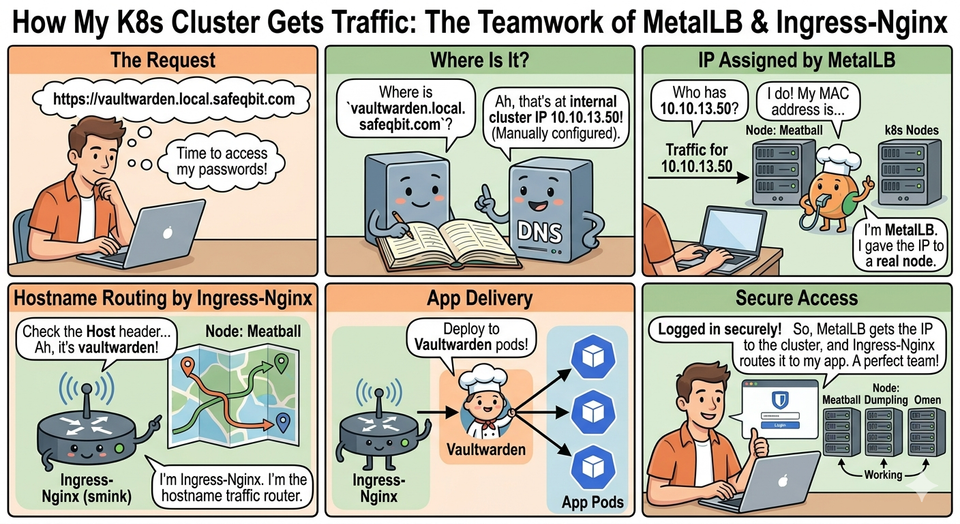
In the cloud, you ask for a LoadBalancer Service and the provider hands you a public IP with a real load balancer behind it. At home there's no provider to ask. So how does typing https://vaultwarden.local.safeqbit.com in my browser actually reach a pod?
Two pieces: MetalLB gives Services real IPs on my LAN, and ingress-nginx takes a single one of those IPs and routes every hostname to the right app. This article follows a request all the way in.
The gap MetalLB fills
A Kubernetes Service of type LoadBalancer is a promise: "give this app a stable external IP." On a cloud, a controller fulfills that promise. On bare metal / a homelab, nothing does - so the Service sits <pending> forever:
$ kubectl get svc -n ingress-nginx
NAME            TYPE           EXTERNAL-IP   PORT(S)
ingress-nginx   LoadBalancer   <pending>    80,443     ◄── nobody to assign an IP
MetalLB is the missing controller. You give it a pool of IPs from
your LAN, and it assigns them to LoadBalancer Services and makes the network actually route to them.
Layer 2 mode (what I run, and why)
MetalLB has two modes: BGP (it speaks a routing protocol to your router) and Layer 2 (ARP-based). I run Layer 2 - it needs zero router configuration, which suits a homelab.
In L2 mode, one node becomes the "leader" for a given IP and answers ARP requests for it. To the rest of the network, that IP looks like a normal host on the LAN:
   Your laptop wants 10.10.13.50
        │  "who has 10.10.13.50?"  (ARP broadcast)
        ▼
   ┌───────────── LAN (VLAN 10.10.13.0/24) ─────────────┐
   │   Meatball          Dumpling          Omen          │
   │   (leader for .50) ◄── "I do! my MAC is …"          │
   └─────────────────────────────────────────────────────┘
        │
        ▼  traffic for .50 now goes to Meatball, into the cluster
A caveat to be honest about: L2 mode is not true load balancing. All traffic for a given IP enters through one node at a time. If that node dies, MetalLB fails the IP over to another node (a few seconds of ARP reconvergence). For a homelab that trade-off is fine; for high-throughput multi-gigabit ingress you'd want BGP.
My address pools
I split the LAN range into two pools so important services get predictable IPs:
# infrastructure/.../configs/metallb-pools.yaml
apiVersion: metallb.io/v1beta1
kind: IPAddressPool
metadata:
  name: reserved-pool
  namespace: metallb-system
spec:
  addresses:
    - 10.10.13.50-10.10.13.59     # hand-assigned via annotation
---
apiVersion: metallb.io/v1beta1
kind: IPAddressPool
metadata:
  name: auto-pool
  namespace: metallb-system
spec:
  addresses:
    - 10.10.13.60-10.10.13.100    # auto-assigned (default)
---
apiVersion: metallb.io/v1beta1
kind: L2Advertisement
metadata:
  name: l2
  namespace: metallb-system
| Pool | Range | Assignment |
|---|---|---|
reserved-pool |
10.10.13.50-59 | Manual, via a Service annotation |
auto-pool |
10.10.13.60-100 | Automatic (default) |
A Service opts into the reserved pool with an annotation:
metadata:
  annotations:
    metallb.io/address-pool: reserved-pool
    metallb.io/loadBalancerIPs: 10.10.13.50
Why not give every app its own IP?
I could give each app a LoadBalancer and burn an IP each. I don't, for a few reasons: IPs are finite, every app would need its own TLS handling, and there's no central place for routing rules. Instead I assign one IP to an ingress controller and let it route everything by hostname. That one IP is 10.10.13.50 - the front door for the whole cluster.
ingress-nginx: one door, many rooms
ingress-nginx is a reverse proxy that reads Ingress objects and turns them into nginx routing rules. You declare "this hostname → that Service," and it does the rest (including terminating TLS).
I run it as a DaemonSet (one pod per node) with externalTrafficPolicy: Local:
controller:
  kind: DaemonSet
  service:
    externalTrafficPolicy: Local      # preserve the real client IP
    loadBalancerIP: 10.10.13.50
- DaemonSet - an ingress pod on every node, so whichever node MetalLB picks as the leader already has a local pod to receive traffic.
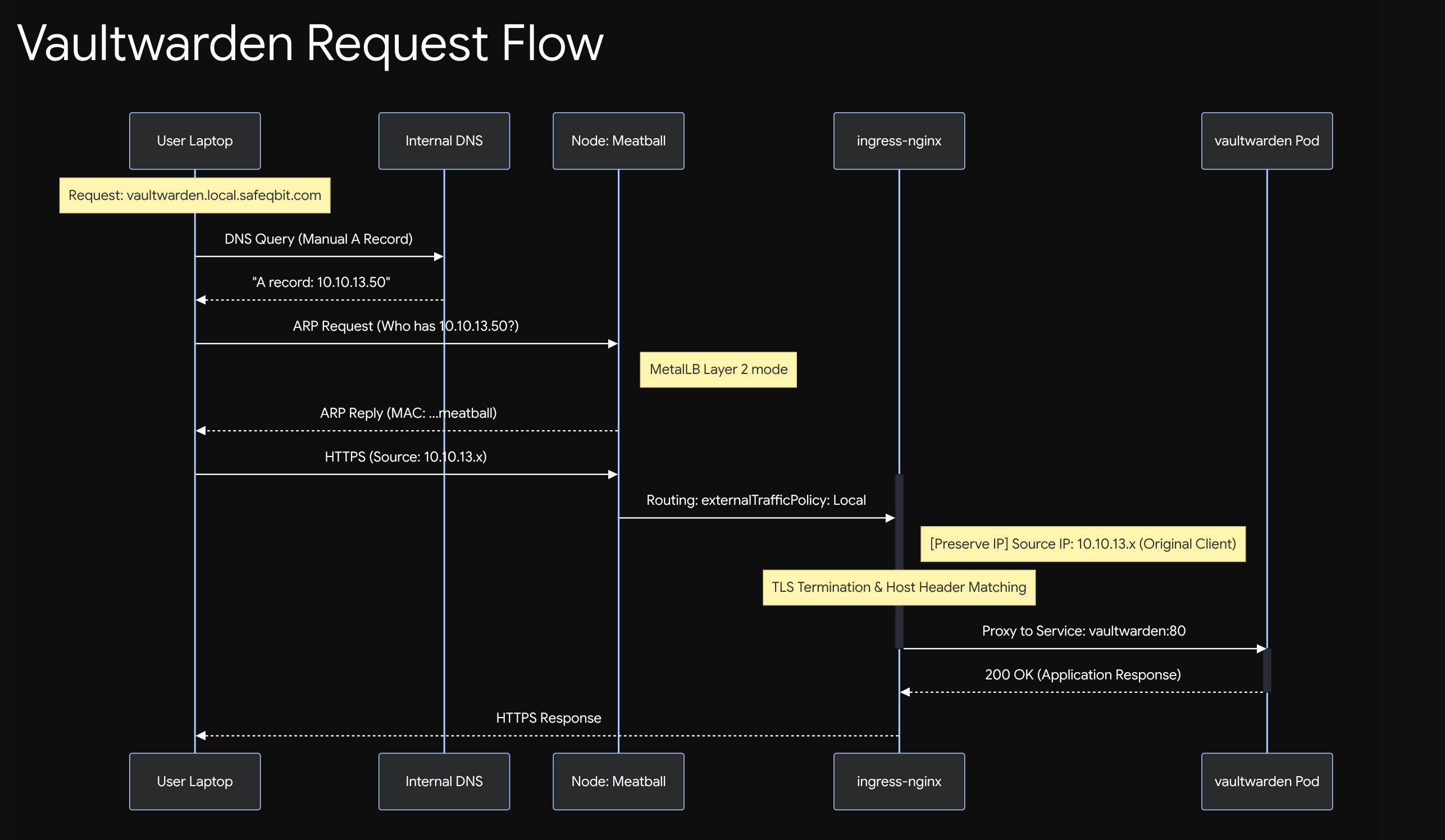
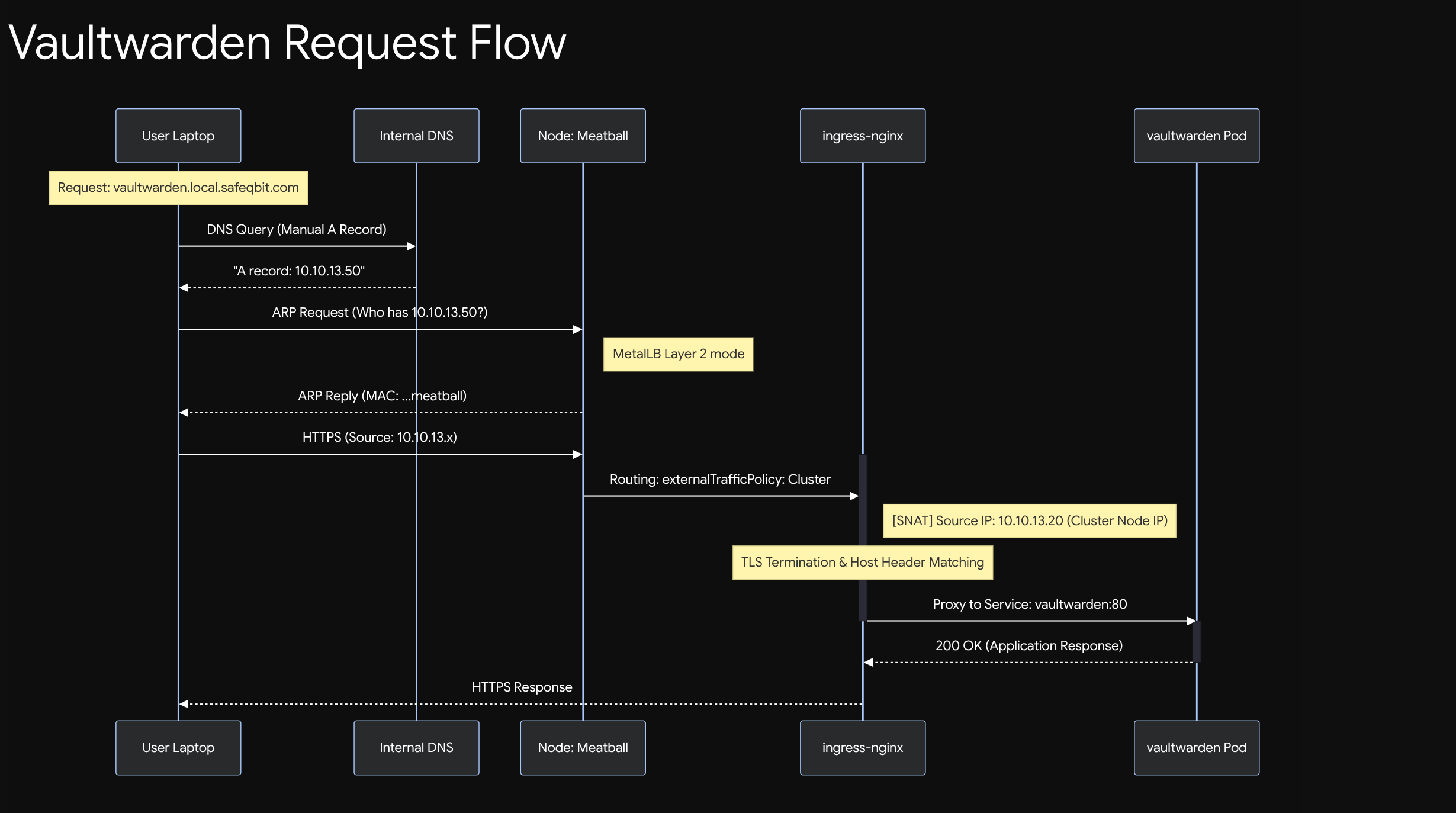
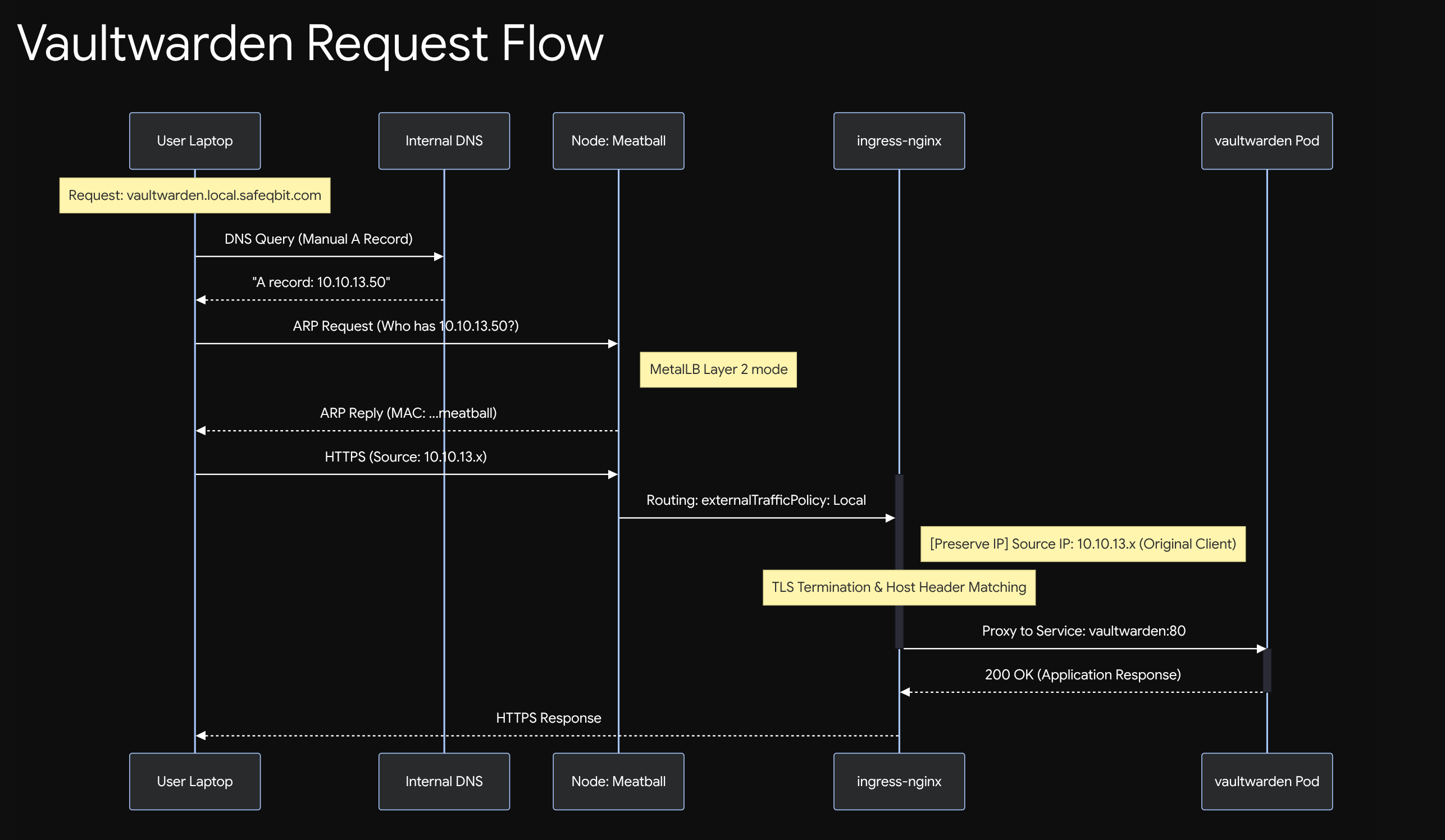
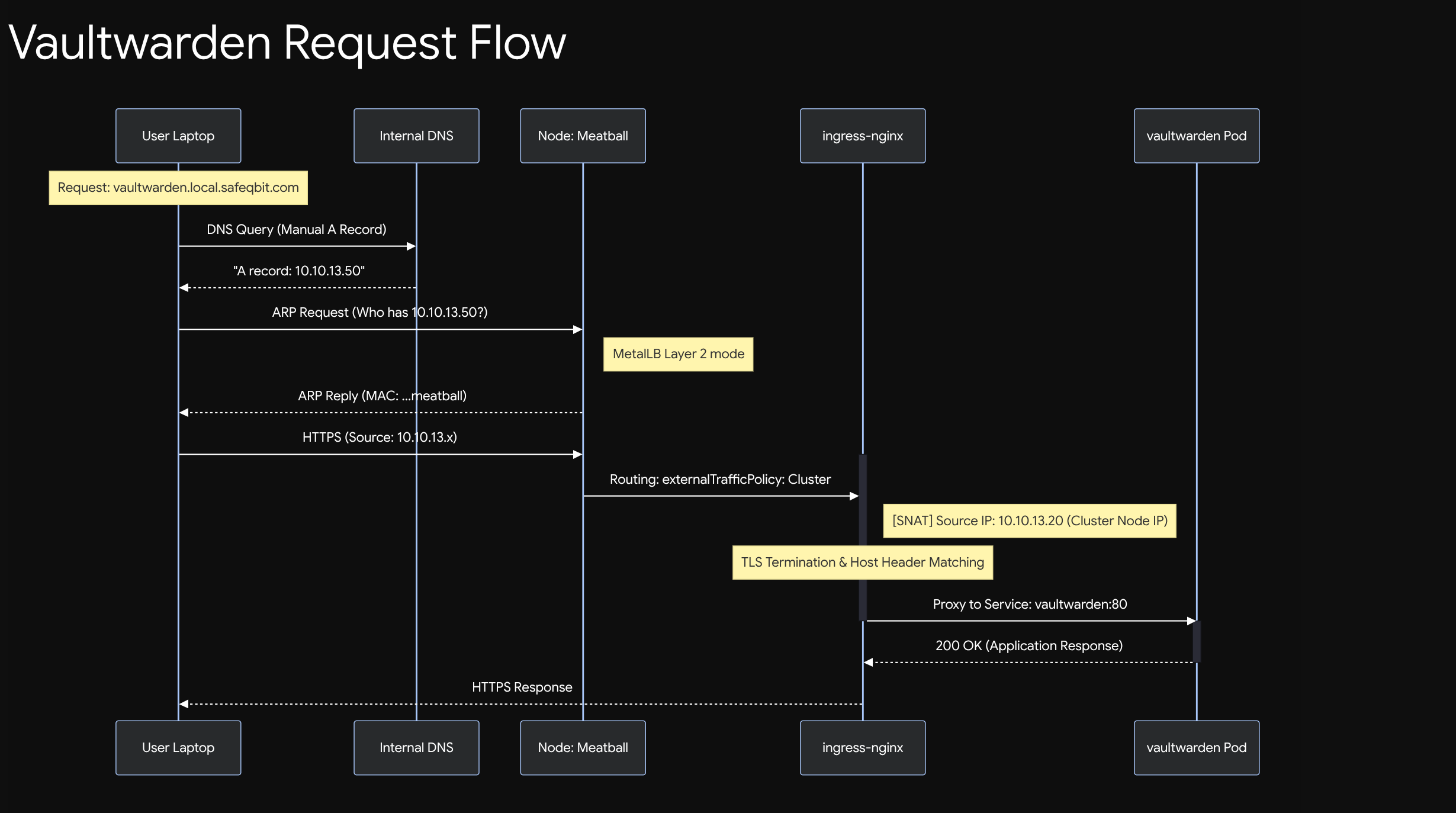
externalTrafficPolicy: Local - this preserves the real client IP. The default (Cluster) lets any node forward to a pod on another node, but it SNATs the source IP in the process, so apps see the internal node IP instead of the visitor. Local keeps the original source address, which matters for things like Vaultwarden's rate-limiting and honest logs. (The trade-off: only nodes actually running an ingress pod can receive traffic - fine here, since the DaemonSet puts one everywhere.)
Example of Vaultwarden request flow with externaltrafficpolicy set to 'local'
Example of Vaultwarden request flow with externaltrafficpolicy set to 'cluster' / SNAT active.
An Ingress object
Each app declares how it's reached:
# apps/.../vaultwarden/06-ingress.yaml
apiVersion: networking.k8s.io/v1
kind: Ingress
metadata:
  name: vaultwarden
  namespace: vaultwarden
  annotations:
    cert-manager.io/cluster-issuer: letsencrypt-prod   # auto-TLS (next article)
spec:
  ingressClassName: nginx
  tls:
    - hosts: [vaultwarden.local.safeqbit.com]
      secretName: vaultwarden-tls
  rules:
    - host: vaultwarden.local.safeqbit.com
      http:
        paths:
          - path: /
            pathType: Prefix
            backend:
              service:
                name: vaultwarden
                port:
                  number: 80
The full path of a request
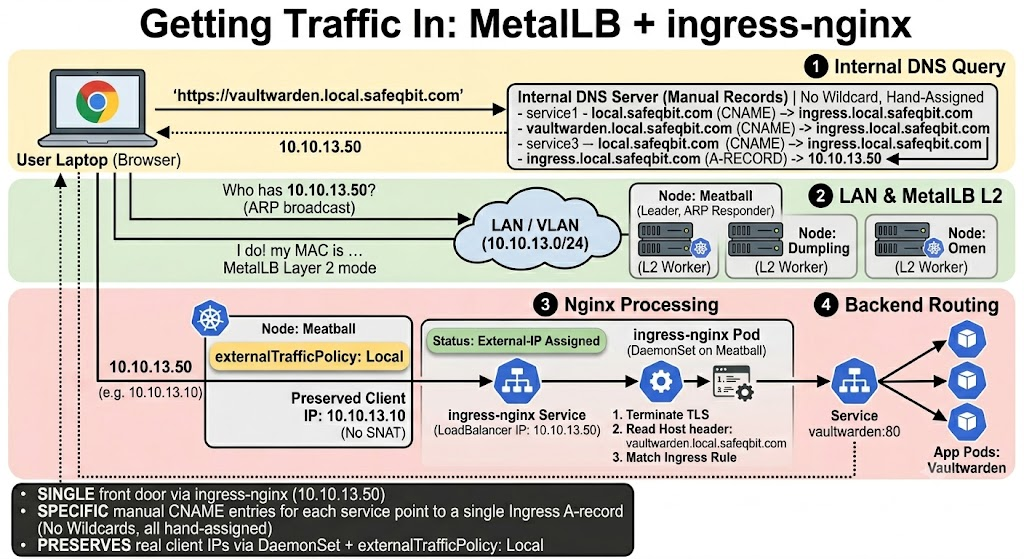
Putting it together, here's every hop from browser to app:
1. Browser: https://vaultwarden.local.safeqbit.com
        │
2. DNS:  <service>.local.safeqbit.com ──► 10.10.13.50   (CNAME DNS entry for each of the services, alternatively you can also use a wildcard dns entry)
        │
3. ARP:  who has 10.10.13.50?  ──► MetalLB leader node answers
        │
4. Packet arrives at that node ──► ingress-nginx pod (the LoadBalancer Service)
        │
5. nginx: TLS terminate, read Host header "vaultwarden.local.safeqbit.com"
        │  match Ingress rule
        ▼
6. forward to Service vaultwarden:80 ──► one of the app's pods
        │
7. app responds ──► back out the same path
DNS is the one piece outside the cluster: a wildcard record (*.local.safeqbit.com → 10.10.13.50) can be used, however I prefer to use manually created CNAME entries for each of my services that point towards an Ingress object with the right hostname.
Troubleshooting ingress
# Did the Service get its external IP from MetalLB?
kubectl get svc -n ingress-nginx        # EXTERNAL-IP should be 10.10.13.50, not <pending>

# Is the Ingress recognised and does it have an address?
kubectl get ingress -A

# Does the backing Service actually have pod endpoints?
kubectl get endpoints -n vaultwarden vaultwarden   # empty = selector matches no ready pods

# What does nginx itself think? (very useful)
kubectl logs -n ingress-nginx ds/ingress-nginx-controller --since=10m
Common gotchas I've hit:
EXTERNAL-IP <pending>→ MetalLB isn't running, or the requested IP is outside its pools, or the pool is exhausted.- 502/503 from nginx → the Service has no ready endpoints. The problem is the app, not ingress - go back to the pod (article 01).
- Wrong app answers → two Ingresses claim the same host, or a stale DNS record. Check
kubectl get ingress -Afor duplicate hosts. - Client IP shows as a node IP →
externalTrafficPolicyreverted toCluster.
Takeaways
- MetalLB is the missing "cloud load balancer controller" for bare metal; L2 mode trades true balancing for zero router config, which is the right call in a homelab.
- One reserved IP (
10.10.13.50) plus ingress-nginx gives every app a clean hostname without spending an IP each. externalTrafficPolicy: Local+ a DaemonSet preserves real client IPs.- A wildcard DNS record makes exposing a new app a one-file change, a CNAME manual entries can be used too which I prefer.
Notice the Ingress quietly asked for a TLS certificate via a cert-manager annotation. How that cert appears automatically and how the app's secrets get into Git safely - is next.
Resources
This cluster
- k3s-safeqbit-local-hq repo - MetalLB pools live in
infrastructure/.../configs/metallb-pools.yaml; per-appIngressobjects in eachapps/.../<app>/folder
Documentation
- MetalLB documentation - concepts, Layer 2 vs BGP, configuration
- MetalLB: Layer 2 mode - the ARP-based mode I run
- ingress-nginx documentation
- Kubernetes: Service - including
type: LoadBalancer - Kubernetes: Ingress
- Preserving the client source IP - why
externalTrafficPolicy: Local
Next lesson → In TLS and secrets, we'll tackle the two things a public-ready cluster needs: automatic HTTPS for hostnames that never touch the internet, and a way to commit your passwords to Git without losing sleep.