Run Windows Apps Natively on Linux
We've all been there. You're happily running Fedora, everything's great, and then your workplace mandates Office 365, or you need MATLAB with toolboxes that only behave on Windows, or some vendor ships a configuration utility that's Windows-only. You stare at the screen and think "do I really need a whole Windows partition for this?"
I've tried multiple workarounds over the years; Wine, Bottles, full VMs with virt-manager, even dual-booting. Recently two projects genuinely changed how I handle this: dockur/windows and WinBoat.
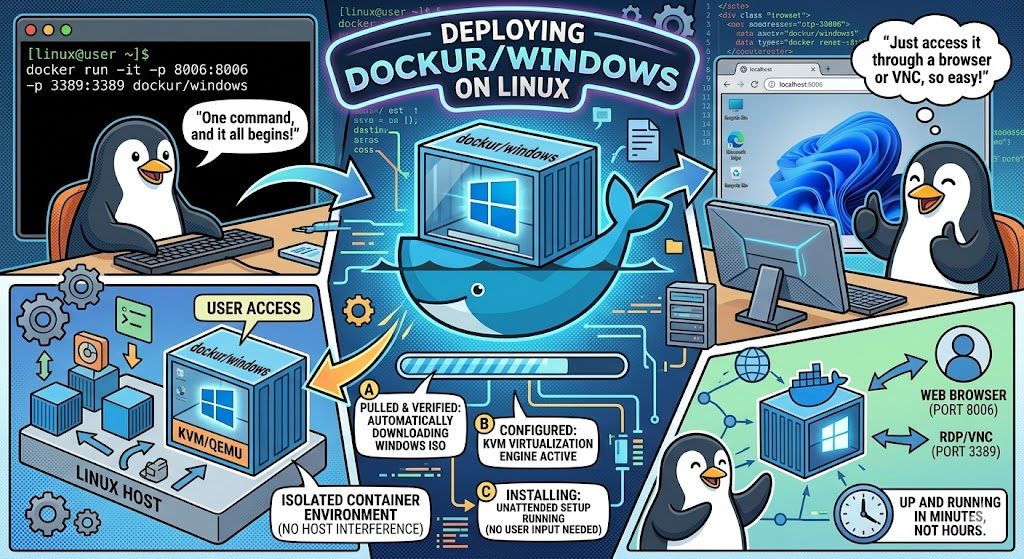
Windows in a Docker Container
The dockur/windows project spins up a full Windows installation using QEMU/KVM, wrapped in Docker's container lifecycle. You write a docker-compose.yml, run docker compose up -d, go make coffee, and come back to a fully installed Windows accessible via your browser on port 8006 or through RDP. The whole install is unattended.
The VERSION environment variable lets you pick from a wide range:
You can also point it at a custom ISO URL or mount a local .iso handy if you have an LTSC image through volume licensing.
Why the Edition Matters
Not all Windows editions behave the same inside a container. The difference in bloat is staggering:
| Win 11 Pro | Win 11 Enterprise | Win 11 LTSC | IoT Ent. LTSC | Server 2022/2025 | |
|---|---|---|---|---|---|
| Start menu ads | Yes | Controllable via GPO | None | None | None |
| Pre-installed junk | Some | Minimal | None | None | None |
| Microsoft Store | Yes | Removable via policy | Not included | Not included | Not included |
| Copilot / Widgets | Yes | Manageable | No | No | No |
| Telemetry | Configurable | Configurable | Minimal | Minimal | Minimal |
| Remote Desktop host | Yes | Yes | Yes | Yes | Yes |
| Group Policy | Yes | Yes | Yes | Yes | Yes |
| Local account default | Yes | Yes | Yes | Yes | Yes |
| Feature updates | Semi-annual | Annual | None (5yr) | None (10yr) | None |
| Support lifecycle | 24 months | 36 months | 5 years | 10 years | 10 years |
If you want Windows to sit in a container, run your apps, and not bother you, LTSC is the move. No ads, no Store, no Copilot, no surprise feature updates. The 11l tag gives you that at 4.7 GB.
WinBoat: The Missing Piece
Dockur/windows gives you a full Windows VM in a container, connect via RDP and get the whole desktop. It works, but it still feels like a VM.
WinBoat builds on dockur/windows and adds RemoteApp via FreeRDP. Individual apps get composited as native OS-level windows on your Linux desktop. You click "Word" in WinBoat's launcher and Word opens as its own window alongside your Linux apps. No full desktop session, no context switching.
Your Linux Desktop
├── WinBoat (Electron UI)
│   └── Docker/Podman Container
│       └── QEMU/KVM → Windows VM
│           └── WinBoat Guest Server (Go)
└── FreeRDP → Individual app windows on your desktop
Why I Use It
Office 365 is the big one. Web versions are fine for quick edits, but having the full version of OneNote is really nice, especially when traveling and wanting to use it offline. Wine can't handle Office 365's constant updates and cloud SSO. CrossOver gets closer but breaks regularly.
Installing WinBoat on Fedora
WinBoat ships an .rpm, so Fedora is straightforward:
1. KVM — verify virtualization is enabled in BIOS, then:
sudo dnf install @virtualization
ls /dev/kvm  # should exist
2. Docker Engine (not Docker Desktop — WinBoat doesn't support it):
sudo dnf -y install dnf-plugins-core
sudo dnf config-manager --add-repo https://download.docker.com/linux/fedora/docker-ce.repo
sudo dnf install docker-ce docker-ce-cli containerd.io docker-compose-plugin
sudo systemctl enable --now docker
sudo usermod -aG docker $USER
Alternatively, WinBoat v0.9.0+ supports Podman, which ships natively with Fedora.
3. FreeRDP 3.x:
sudo dnf install freerdp
freerdp3 --version  # confirm 3.x
4. WinBoat:
sudo dnf install ./winboat-*.rpm
# or AppImage: chmod +x winboat-*.AppImage && ./winboat-*.AppImage
5. Configure — launch WinBoat, pick your Windows version (11l for LTSC if you have licensing, Pro otherwise), allocate resources, and let it install. Once Windows is up, install Office 365 or whatever you need. Apps show up in WinBoat's launcher as individual RemoteApp entries.
Wine vs. Proton vs. WinBoat
| Wine | Proton (Steam) | WinBoat | |
|---|---|---|---|
| Approach | API translation | Wine + Valve patches + DXVK | Full Windows VM + RemoteApp |
| Needs Windows license | No | No | Yes (or evaluation) |
| App compatibility | ~60-70% | ~95% of Steam games | ~100% — real Windows |
| Office 365 | Broken | Not its job | Full support |
| MATLAB (full toolbox support) | Partial | No | Full support |
| GPU acceleration | Yes | Yes | No (planned) |
| Resource overhead | Minimal | Minimal | Significant (full VM) |
| Disk space | ~1-2 GB | Per-game | 32 GB+ |
| Host isolation | Partial | Partial | Full — containerized |
| USB passthrough | Limited | No | Yes (experimental) |
| Filesystem sharing | Native | Steam library | Home dir mounted |
| Clipboard | Yes | N/A | Yes, via RDP |
Bottom Line
For any Windows-only productivity app that Wine doesn't run well, Office 365, MATLAB toolboxes, Adobe Creative Suite, vendor config utilities, WinBoat fills a gap I've been working around for years. It's not lightweight (you're running a full VM), there's no GPU acceleration yet, and it's still in beta. But the RemoteApp compositing makes it feel nothing like a VM in practice. Word is just a window. MATLAB is just a window.
If you've been duct-taping Wine prefixes together or spinning up virt-manager just to open a spreadsheet, give WinBoat a shot. Pair it with an LTSC image for the cleanest experience.