FortiGate Best Practices Part 2: Network Segmentation for a Hardened Infrastructure
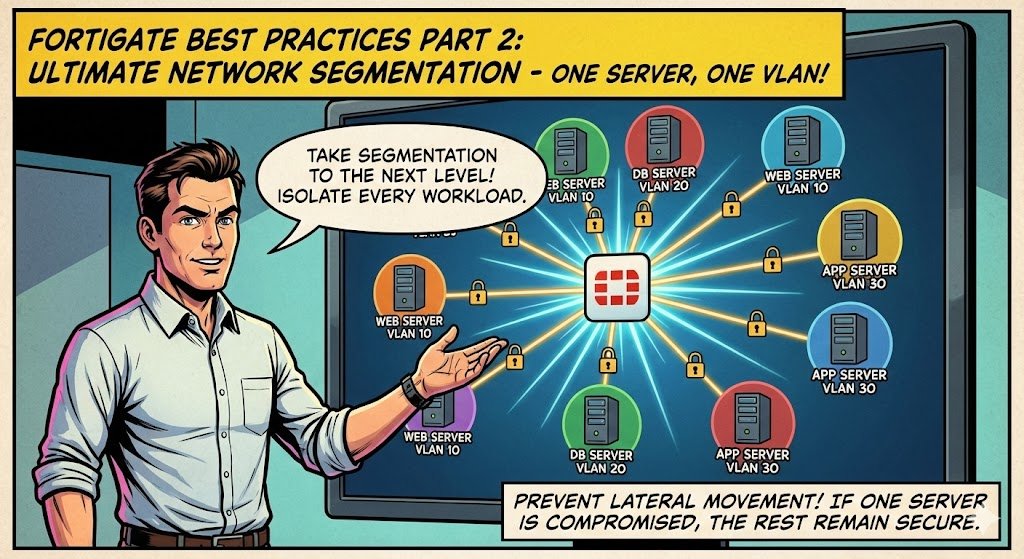
In Part 1, I covered essential firewall objects including ISDB blocking, external threat feeds, geo-blocking, ASN whitelisting, and local-in policies. In this part, I want to focus on something more foundational: how you segment your network in the first place. The best firewall policies in the world mean very little if an attacker can move laterally across your environment unchecked once they compromise a single host.
The recommendations in this post are ones I feel strongly about. Some of them, particularly the server LAN segmentation approach, are admittedly controversial and require more upfront effort. However, in today's threat landscape, I believe the security benefits far outweigh the operational overhead, especially when modern tools like network automation and Infrastructure as Code (IaC) are available to manage the complexity.
1. DMZ Segmentation: One VLAN Per Server
This is one of my most highly recommended practices. The traditional approach of placing all DMZ servers into a single shared VLAN is a significant security risk. If an attacker compromises one server in that DMZ, they can communicate directly with every other server on the same VLAN at Layer 2 without ever passing through the firewall. This makes lateral movement trivial and completely bypasses all the inspection, logging, and policy enforcement your FortiGate provides.
The solution is straightforward: assign each DMZ server its own dedicated VLAN using a /29 or /30 subnet.
Why /29 or /30?
A /30 gives you two usable IPs (one for the server, one for the gateway), which is ideal for a single-server segment. A /29 gives you six usable IPs, which provides a small amount of room if a server needs a secondary IP or if you have a tightly coupled pair of services that must communicate directly. In most cases, /30 is sufficient and preferred.
What This Achieves
When each server lives in its own VLAN, all inter-server communication must traverse the FortiGate. There is no direct Layer 2 path between servers. This means:
- Lateral movement is eliminated at the network level. A compromised web server cannot directly reach your mail relay or DNS server. The attacker must go through the firewall, where your policies, IPS, application control, and logging are enforced.
- Full traffic visibility. Every packet between DMZ servers appears in your firewall logs. You can see exactly what is communicating with what, on which ports, and apply security profiles to all of it.
- Granular policy control. You can create precise policies such as "Web Server A can talk to Database Server B on port 3306 only" rather than relying on broad DMZ-to-DMZ rules.
- Blast radius containment. If a server is compromised, the impact is contained to that single /29 or /30 segment. Incident response becomes significantly more manageable.
Example Configuration
Assuming you have three DMZ servers (a web server, a mail relay, and a DNS server), the VLAN layout would look something like this:
config system interface
    edit "dmz-web01"
        set vdom "root"
        set ip 10.10.1.1 255.255.255.252
        set allowaccess ping
        set interface "your-physical-port"
        set vlanid 110
    next
    edit "dmz-mail01"
        set vdom "root"
        set ip 10.10.2.1 255.255.255.252
        set allowaccess ping
        set interface "your-physical-port"
        set vlanid 120
    next
    edit "dmz-dns01"
        set vdom "root"
        set ip 10.10.3.1 255.255.255.252
        set allowaccess ping
        set interface "your-physical-port"
        set vlanid 130
    next
end
Then create explicit policies for any required inter-server communication:
config firewall policy
    edit 0
        set name "DMZ-Web01-to-Mail01-SMTP"
        set srcintf "dmz-web01"
        set dstintf "dmz-mail01"
        set srcaddr "all"
        set dstaddr "all"
        set action accept
        set schedule "always"
        set service "SMTP"
        set logtraffic all
        set utm-status enable
        set ips-sensor "default"
        set comments "Allow web server to send mail via relay"
    next
end
Any communication not explicitly permitted is denied by default. This is exactly how a DMZ should operate.
2. Server LAN Segmentation: One VLAN Per Server
I will be upfront: this is a controversial recommendation. Most network engineers will push back on the idea of giving every internal server its own VLAN. The immediate concern is operational overhead, and that concern is valid. More VLANs means more interfaces to manage on the FortiGate, more trunk configurations on your switches, more IP address planning, and more firewall policies to maintain.
However, I strongly believe the security benefits justify the effort, and I want to explain why.
The Problem with Flat Server VLANs
In a traditional server LAN, all your internal servers (Active Directory, file servers, application servers, database servers, management tools) sit on one or two shared VLANs. This means any server can communicate freely with any other server at Layer 2. If an attacker compromises a single server, they can move laterally across your entire server infrastructure without the firewall ever seeing that traffic.
This is not a theoretical risk. It is the exact technique used in the majority of ransomware attacks and APT campaigns. Compromise one endpoint, move laterally to the domain controller, and it is over.
The Per-Server VLAN Approach
The same principle applied to the DMZ applies here. Each server gets its own VLAN with a /29 or /30 subnet. All server-to-server communication is forced north through the FortiGate, where it is inspected, logged, and subject to policy enforcement.
The Benefits
Enhanced Isolation. No server can communicate with another server without traversing the firewall. Lateral movement at Layer 2 is physically impossible.
Increased Visibility and Monitoring. Every east-west traffic flow between servers now passes through the FortiGate and appears in your logs. You gain complete visibility into which servers are communicating, on which ports, and how frequently. This is invaluable for detecting anomalous behavior, identifying shadow IT dependencies, and supporting compliance audits.
Increased Control via Application Control and IPS. Because all inter-server traffic passes through the FortiGate, you can apply full security profiles to it. IPS signatures can detect exploit attempts between servers. Application control can identify and block unexpected protocols. This level of inspection is simply not possible when servers communicate directly on a shared VLAN.
Granular Policy Control. Instead of broad "server VLAN to server VLAN" rules, you can define precise policies: "App Server A can reach Database Server B on port 5432, and nothing else." This aligns with zero-trust principles and provides a clear, auditable security posture.
Addressing the Overhead Concern
Yes, this approach requires more planning and more configuration. There is no way around that. However, I want to push back on the idea that this overhead is unmanageable in 2026:
Network automation and IaC make this practical. Tools like Ansible, Terraform, and FortiManager's scripting capabilities can templatize VLAN creation, switch port configuration, and firewall policy generation. What used to be hours of manual CLI work can become a repeatable workflow that takes minutes.
FortiGate appliances are powerful enough. Modern FortiGate hardware, even the mid-range models, can handle hundreds of VLAN interfaces and thousands of policies without breaking a sweat. The NP7 and SP5 processors in current-generation appliances are specifically designed for this kind of workload. Performance is not the bottleneck it may have been five or ten years ago.
The alternative is worse. The operational overhead of managing per-server VLANs is predictable and plannable. The operational overhead of responding to a ransomware incident where an attacker moved laterally across your flat server VLAN is not. One is a proactive investment in security; the other is a reactive crisis.
Example Workflow with Automation
A simplified deployment workflow might look like this:
- New server is provisioned
- Automation assigns the next available VLAN ID and /30 subnet from your IPAM
- FortiGate VLAN interface is created via API or CLI script
- Switch trunk is updated to carry the new VLAN
- Firewall policies are generated from a template based on the server's role (web server, database, AD, etc.)
- Server is deployed into its dedicated segment
This can be captured in a playbook or pipeline and executed consistently every time.
3. Container Segmentation
For containerized workloads running in Docker, the same segmentation principles apply. Containers on a default Docker bridge network can communicate freely with each other, which presents the same lateral movement risk discussed above.
I have written a separate detailed guide on implementing MACVLAN networking in Docker, which assigns each container its own routable IP on your physical network. This allows the FortiGate to see and control container traffic the same way it would any other host on the network. I recommend reviewing that guide for the full implementation details and best practices.
Wrapping Up
Network segmentation is not a new concept, but the depth at which I recommend applying it may be more aggressive than what most environments currently implement. The core principle is simple: force all traffic through the firewall so it can be inspected, logged, and controlled. Whether that traffic is between DMZ servers, internal servers, or containers, the same logic applies.
To summarize: yes, per-server VLANs require more work. But the benefits of enhanced isolation, full east-west visibility, security profile enforcement on inter-server traffic, and granular policy control are substantial and important in today's threat landscape. Combined with network automation and the processing power of modern FortiGate appliances, this approach is not only achievable but increasingly practical for organizations of all sizes.
If you found this post helpful or would like assistance implementing these practices in your environment, feel free to reach out.